
Software license agreement template
Common Paper's Software License Agreement 1.1 licenses software a customer installs on its own systems: an Order Form sets fees and permitted uses, and Key Terms set liability.
- Common Paper 1.1 · lawyer-written
- Free to use
Loading PDF preview…
When should you use a software license agreement?
Use it when your business delivers software the customer installs and runs on systems it owns or controls, for a set license period and fee.
- On-premises or self-hosted software
- Apps, servers or plugins the customer runs itself, with a Deletion Procedure for the end of the license.
- Limits on use
- Seats, locations or regions go in the License Limits box.
- Ongoing updates and maintenance
- Updates come at no extra charge, and a Services box describes support on top.
- When it fits less well
- If the customer only logs in to software you host, a SaaS agreement fits.
What does this software license agreement cover?
An Order Form and Key Terms carry the choices, and the Standard Terms version 1.1 follow in eleven sections.
- 1. Software
- A limited, non-exclusive, non-transferable license to install and use the software for the Permitted Uses. It covers user accounts, feedback, open source notices, and Updates the customer installs promptly.
- 1.4 Machine Learning
- Usage data may train the provider's AI models once aggregated and, with commercially reasonable efforts, de-identified. AI output may be wrong and isn't a substitute for human oversight.
- 2. Restrictions & Obligations
- No reverse engineering, bypassing license protection, publishing performance test results without approval, or use in embargoed countries. Use must stay inside the License Limits.
- 3. Payment & Taxes
- Invoices bill usage-based fees in arrears and other fees in advance; automatic payment charges the card on file. Disputes are raised before payment is due.
- 4. Term & Termination
- Each order renews unless notice arrives before the Non-Renewal Notice Date. When it ends, the customer follows the Deletion Procedure and pays a final invoice.
- 5. Representations & Warranties
- For the Warranty Period, the software substantially conforms to its documentation. Modified software, misuse and skipped Updates are excluded. The fix is repair, corrected documentation, or an equivalent replacement.
- 6 and 7. Disclaimer and Limitation of Liability
- Liability is capped at the General Cap Amount, with a separate Increased Cap Amount for Increased Claims and no cap for Unlimited Claims. The damages waiver doesn't shield a customer that breaks the license or its restrictions.
- 8. Indemnification
- The provider defends IP claims against the software. Its duty ends if the claim comes from an old version an Update would have avoided.
- 9 to 11. Confidentiality, General Terms, Definitions
- The provider may use the customer's confidential information to provide the product and services. The general terms add beta products, logo rights and U.S. government rights.
How do you fill in the software license agreement?
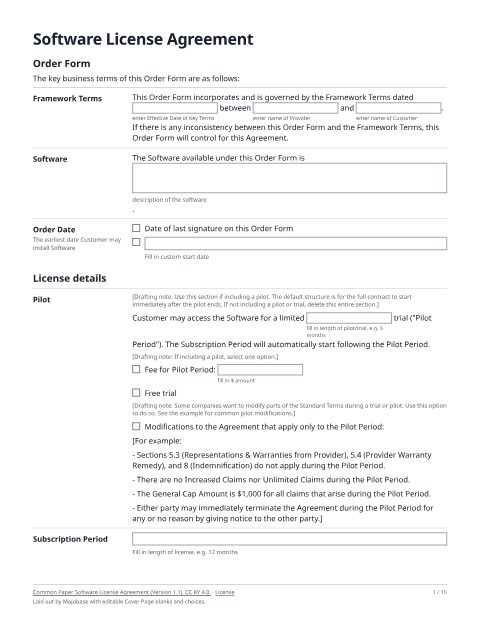
The Order Form covers this license and the Key Terms cover every order under them. Each page has a signature block with legal names.
- Key Terms date, names and the software
- Link the order to its Key Terms, then describe the software.
- Earliest install date
- The Order Date is the earliest day the customer may install: the last signature, or a date you set.
- Pilot and license length
- An optional pilot runs for the months you name, paid or not, and can switch off chosen terms until it ends. Then give the license length, such as 12 months.
- Fees and payment
- Describe the fees, then optionally allow or fix a renewal increase, or make fees tax-inclusive. Choose invoices with days to pay, or automatic charges.
- Renewal
- Keep automatic renewal with a notice period in days, or switch it off so the order ends with its term.
- Permitted Uses and License Limits
- Tick internal use by the customer, by the customer and its affiliates, or describe other uses. Write any seat, site or region limits.
- Warranty Period
- A number of days, counted from first delivery, from each delivery and Update, or from the Order Date.
- Deletion Procedure
- Tick any steps: the provider disables keys, the customer uninstalls, the customer certifies deletion, or your own.
- Services and order changes
- Describe support or maintenance included, and any changes for this order only.
- Law, courts and covered claims
- Pick the law that governs (a state, province or country) and the place whose courts hear disputes. Then choose who indemnifies: the provider for IP infringement by the software, the customer for breaking the license, or both.
- Caps and claims
- The general and increased caps each take a multiple of 12 months' fees, a dollar figure, or the greater of both. Tick which claims get the higher cap and which have none.
- Extra promises, DPA and term changes
- Add warranties either side makes, say where a DPA is, and list changes to the Standard Terms.
Which related document do you need?
Installed software often comes with a data agreement, a project for setup, or an NDA for the sales talks.
- Cloud service agreement
- Use it instead when you host the software and the customer only logs in.
- Data processing agreement
- Attach one when the software sends personal data back to you, such as through usage data or support.
- Statement of work
- Sets deployment or integration deliverables beyond the support the Services box describes.
- Pilot agreement
- A trial run under its own short terms before the license is bought.
- One-way NDA
- Protects source code, architecture or pricing you show a prospect before the license is signed.
What else do people ask?
How is a software license agreement different from a SaaS agreement?
A license lets the customer install and run the software on systems it controls, so this one adds License Limits, a Warranty Period tied to delivery, required Updates and a Deletion Procedure. A SaaS agreement gives access to software the provider hosts, so it deals with hosted data, uptime and deleting customer content instead.
Can the provider audit how the software is used?
The Order Form has an optional License Compliance Verification row. As written, it lets the provider audit use during the Subscription Period with at least 7 days' notice, and the customer pays for any use beyond what the agreement allows. The row can be deleted, or its wording edited to change the notice or scope.
Does the customer get updates?
Yes. Section 1.6 gives the customer, at no additional charge, the Updates and updated documentation the provider makes generally available to customers of the same product during the Subscription Period. The customer must install them as soon as practicable. Skipping them matters: the warranty excludes issues from Updates not installed, and the IP indemnity excludes claims an Update would have avoided.
Can usage data be used to train AI?
Section 1.4 allows it for AI and machine learning models in the provider's products, including third-party components. Usage data must be aggregated first, and the provider uses commercially reasonable efforts to de-identify it. The section doesn't reduce the provider's duties for personal data under data protection laws.
What happens when the license ends?
The customer loses the right to use the product and follows the Deletion Procedure chosen on the Order Form, such as uninstalling the software or certifying that it was deleted, while the provider may disable license keys. Each side returns or destroys the other's confidential information, and the provider sends a final invoice for fees accrued before the end.